






HELLO TO ANYONE WHO MAY BE READING THIS!
If you’re reading this, you were most likely redirected here by a PIC staff member. If so, you’re in the right place! With CPZero being a very new CPPS, it’s a given that there will be some issues, or you may not have an account yet. CPZero does not have the best optimization on web browsers, so it makes participating in our igloo raids, takeovers, and other events very difficult. With all that said, keep reading to learn how to make an account and how to fix the lag to be able to run CPZero smoothly!
(For daily events, an active community, guides, and more, make sure to check out our Discord Server!)
Section 1: Creating a CPZero Account
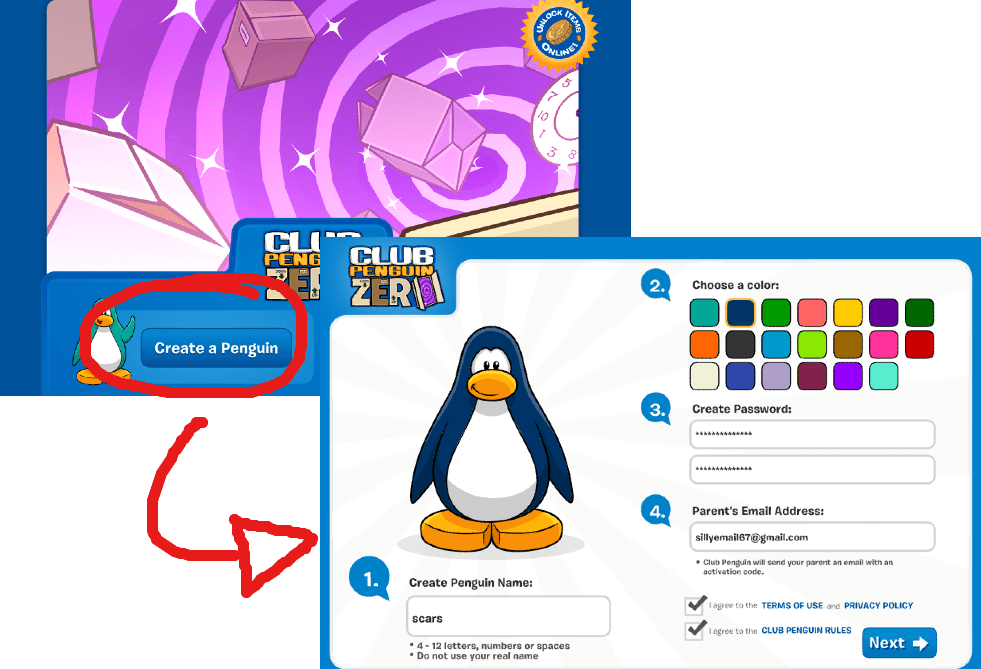
This is a very simple step. When opening the website, there is a big button on the bottom left that says “Create a Penguin.” From there, follow the steps provided to register an account. Also, the color you pick is completely optional, but PIC’s personal color is DARK BLUE, so make sure to pick dark blue if you want to be able to participate in certain events without needing to buy it in the future!
Section 2: How To Optimize Performance
(ALWAYS MAKE SURE WHAT YOU’RE DOWNLOADING ONLINE IS SAFE!!)
This step is entirely optional, as I’m sure many are skeptical of downloading software off the internet. However, CPZero actively promotes this launcher, and I myself have personally used it without issue.
STEP 1: Downloading The Client
In order to download the client, you must head to the CPPSLauncher GitHub and download either the setup or the portable launcher; either works, it just comes down to preference. I personally downloaded the setup.
https://github.com/Dragon9135/CPPS-Launcher/releases/latest

For those who downloaded the portable, simply open the file.
For those who downloaded the setup: open the file, complete the setup, and open the application from your start menu.
STEP 2: Opening CPZero In The Launcher
Once the launcher is open, go to the top left and click on “Servers.” Once clicked, a dropdown should appear with a list of several Club Penguin Private Servers. Since this guide is specifically about CPZero, we will be clicking “Club Penguin Zero.”

STEP 3: All Done Yayyy!!!!
Once you have navigated to CPZero inside the launcher, you’re all set! The launcher acts just as if you were opening CPZero in the browser, so log in as normal, and you’re all good to go!
Now that you know how to create an account and optimize your game, you’re ready to start playing! We hope to see you at our events, and we hope you have a great day!

Filed under: CP Zero, CPPS Guides | Tagged: club penguin, club penguin zero, club penguin zero guide, cpps, cpps guide, cpz, cpz account, cpz guide, cpzero, cpzero account, cpzero guide, cpzero starter guide, guide, people's imperial confederation, people's imperial confederation club penguin, people's imperial confederation cp, pic, pic club penguin, piccp, starter guide, zero |





 People's Imperial Confederation of Club Penguin
Leave a comment